Table of Contents
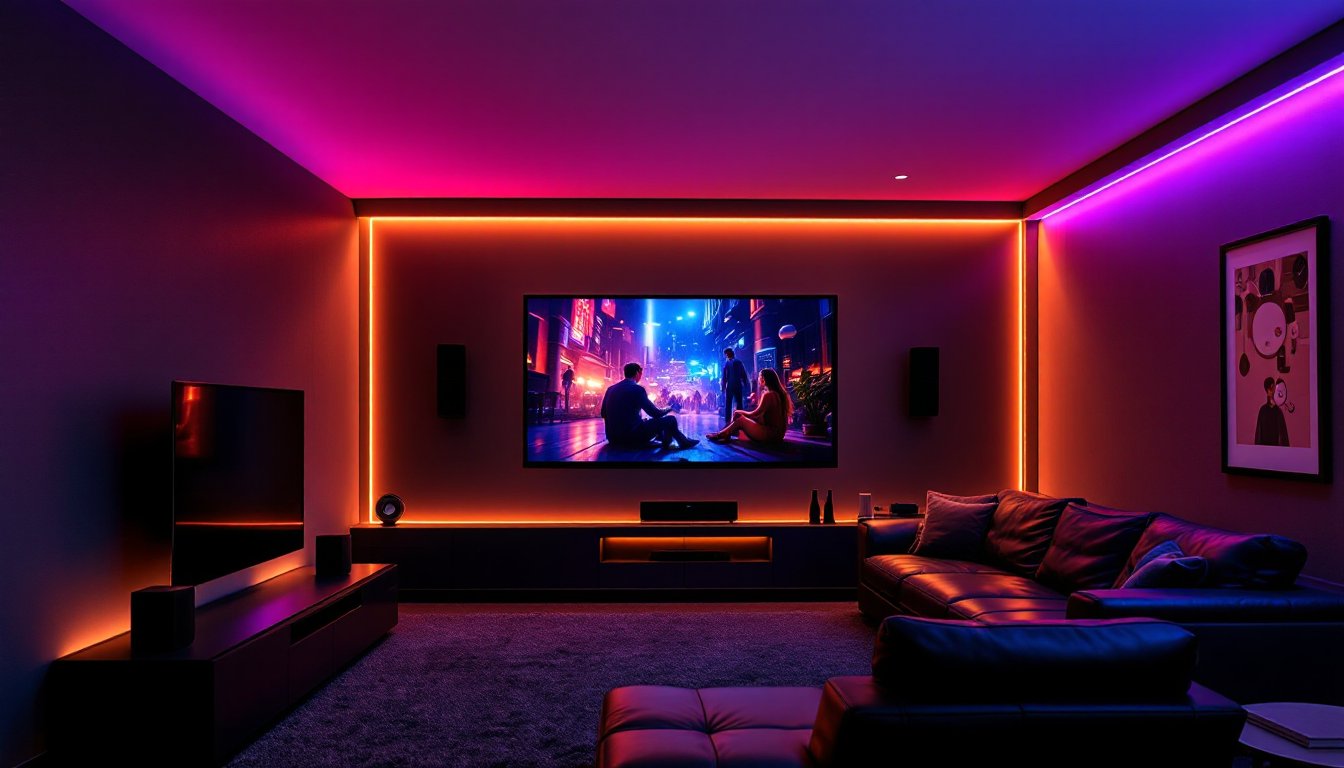
ToggleNothing ruins a movie night faster than glare on the screen or fumbling for light switches in the dark. A proper home theater LED lighting setup fixes both problems, and elevates the entire viewing experience. LEDs consume a fraction of the power compared to incandescent bulbs, run cool enough to install behind screens and furniture, and offer color control that lets viewers dial in everything from subtle warm tones to dynamic RGB scenes. Whether someone’s converting a basement, a spare bedroom, or just upgrading the family room, understanding LED placement, color temperature, and dimming options transforms a couch-and-TV setup into a space that rivals the multiplex down the street.
Key Takeaways
- Home theater LED lighting reduces eye strain and screen contrast fatigue by providing soft bias lighting behind displays, making longer viewing sessions more comfortable.
- LED strips consume 80% less power than incandescent bulbs and produce minimal heat, making them ideal for enclosed spaces like wall cavities and AV cabinets in your home theater setup.
- Bias lighting should use 6500 K (daylight white) color temperature to match industry TV calibration standards and preserve accurate picture quality.
- Plan your home theater LED layout in three zones—task lighting for safe movement, bias lighting behind screens, and accent strips for mood—then measure each run separately to determine power supply requirements.
- Smart LED controllers with voice integration and automation features add convenience and customization, while simple dimmable strips with a remote provide 80% of the benefits at a lower cost.
- RGB or RGBW accent strips work best for decorative purposes and can shift colors to match movie themes, but avoid RGB for bias lighting to maintain color accuracy behind screens.
Why LED Lighting Is Essential for Your Home Theater
LED strips and fixtures solve three core challenges in any theater space: eye strain, contrast degradation, and safe navigation. When a bright TV or projector screen sits in a pitch-black room, the extreme contrast forces pupils to constantly dilate and contract, leading to headache and fatigue during longer films. A soft glow behind the screen, called bias lighting, reduces that contrast gap without washing out picture quality.
LEDs also generate minimal heat compared to halogen or incandescent bulbs, which matters when mounting strips in enclosed soffits, behind wall panels, or inside AV cabinets where ventilation is limited. A typical 16-foot reel of 5050 RGB LED strip draws 24 watts at full white, versus 120 watts for equivalent incandescent rope light. Lower heat output means safer installation and no risk of warping trim or melting plastic cable raceways.
Finally, LEDs last 25,000 to 50,000 hours depending on quality and duty cycle. That’s fifteen years of nightly three-hour movie sessions before needing replacement. Combine longevity with dimming capability and color tuning, and it’s clear why LEDs have become the default for dedicated theater builds and casual living-room upgrades alike.
Types of LED Lighting for Home Theaters
Bias Lighting for Screens
Bias lighting refers to a light source placed directly behind or around the display to create a neutral glow that fills the viewer’s peripheral vision. The ideal color temperature for bias lighting sits at 6500 K (kelvin), daylight white, because it matches the D65 standard used to calibrate TV panels. Warmer tones (3000 K) or RGB color shifts can skew perceived screen colors and reduce accuracy.
Most builders use a 12 V DC LED strip with adhesive backing, mounted on the rear of the TV or along the frame of a projection screen. For a 65-inch display, a single two-meter strip with 60 LEDs per meter provides even coverage. Connect the strip to a dimmable DC power supply so brightness can be adjusted based on ambient light and content. Avoid RGB strips for bias lighting, stick to dedicated daylight-white or tunable-white strips.
For front-projection setups, mount the strip to the back of the screen frame or to the wall behind the screen. Keep the LEDs at least two inches from the screen fabric to prevent visible hot spots. If the screen is tensioned in a fixed frame, run the strip along all four sides for uniform backlight.
Accent and Ambient LED Strips
Accent lighting highlights architectural features, crown molding, columns, soffits, or wall niches, and adds visual depth without competing with the screen. RGB or RGBW strips work well here because color can shift to match movie themes or create preset scenes (dim red for action films, cool blue for sci-fi).
Popular mounting locations include:
- Ceiling cove or soffit: Creates indirect uplight that bounces off the ceiling.
- Baseboards or toe kicks: Provides low-level path lighting for safe movement during a film.
- Behind furniture or AV racks: Adds subtle glow without spill onto the screen.
Choose 5050 or 2835 LED chips depending on brightness needs. 5050 chips emit roughly 18–22 lumens per LED and work well for general accent work. 2835 chips are smaller and slightly more efficient, ideal for tight channels or aluminum profiles. When planning cozy lighting schemes, RGBW strips (which include a dedicated white channel) offer better color rendering than RGB-only models that mix red, green, and blue to approximate white.
How to Plan Your Home Theater LED Lighting Layout
Start by sketching the room on graph paper or in a simple CAD tool, marking screen position, seating, doors, and any architectural features. Identify three lighting zones: task (for safe entry and exit), bias (behind the screen), and accent (decorative or mood).
Bias zone: Measure the perimeter of the screen or TV. For a 75-inch TV (roughly 65 inches wide by 37 inches tall), the perimeter is about 204 inches or 17 feet. Round up to an 18-foot (5.5-meter) reel to allow slack for corners. If using a projector screen, measure the frame’s rear perimeter.
Accent zones: Measure each run separately. A typical 12×16-foot room with 8-foot ceilings might have a 28-foot crown-molding perimeter. If installing cove lighting, subtract the screen wall to avoid spill. For baseboard path lighting, measure the sum of walkways, usually the rear and side walls.
Power budget: Each reel of LED strip lists wattage per meter or per foot. A 5-meter reel of RGB strip at 14.4 watts per meter draws 72 watts total. Add 20 percent overhead for the power supply (72 × 1.2 = 86.4 watts), so a 100 W, 12 V DC supply handles one reel. If running multiple zones, either use one large supply with a distribution block or individual supplies per zone.
Dimming and control: Decide whether dimming will be manual (inline rotary dimmer), remote (IR or RF controller), or smart (Wi-Fi/Zigbee). Smart controllers integrate with voice assistants and home automation platforms, which many integrated home automation setups already support. Plan wire routing from the controller to each strip, keeping low-voltage DC runs under 20 feet to minimize voltage drop. For longer runs, use 16 AWG or 18 AWG stranded wire and consider mid-run power injection.
Check if any structural modifications, cutting into drywall for cove details, running wire through walls, require permits. Cosmetic surface-mount LED installation typically does not, but verify local codes if fishing wire through studs or installing new electrical boxes.
Step-by-Step Installation Guide for LED Strips
Materials and tools:
- LED strip (bias: 6500 K white: accent: RGB or RGBW)
- 12 V DC power supply (sized to total wattage + 20%)
- LED controller (if using RGB or smart features)
- 16 AWG or 18 AWG stranded wire
- Solderless connectors or solder/heat-shrink kit
- Cable clips or adhesive wire channels
- Isopropyl alcohol and lint-free cloth
- Wire stripper, scissors, utility knife
- Safety: Safety glasses when cutting or soldering: work gloves if handling sharp aluminum profiles
Step 1: Prep the surface. Clean mounting areas with isopropyl alcohol to remove dust, grease, and paint residue. Adhesive backing on LED strips bonds poorly to dirty or textured surfaces. For drywall or wood trim, a quick wipe is enough. For glossy surfaces, lightly scuff with 220-grit sandpaper to improve adhesion.
Step 2: Measure and cut. LED strips have cut marks every few inches (typically every three LEDs on 12 V strips). Measure the exact run, mark the strip at the nearest cut line, and use sharp scissors or a utility knife. Do not cut between marks, doing so leaves non-functional segments.
Step 3: Connect power leads. If the strip includes a barrel-jack pigtail, plug directly into the power supply or controller. If bare copper pads are exposed, either solder 18 AWG wire to the positive (+) and negative (–) pads, or use solderless clamp connectors. Match polarity carefully: reversed polarity won’t damage most strips but prevents them from lighting. Heat-shrink any solder joints to prevent shorts.
Step 4: Mount the strip. Peel the adhesive backing a few inches at a time and press firmly along the mounting surface. For vertical or overhead runs, add supplemental cable clips every 12 inches, adhesive alone can fail over time, especially in warm environments. If installing in an aluminum channel (recommended for a clean look and better heat dissipation), slide the strip into the channel before peeling backing, then mount the channel with screws or adhesive.
Step 5: Route and secure wiring. Run low-voltage wire from the power supply to the strip location, stapling or clipping every 18 inches. Avoid running LED wire parallel to 120 V AC lines for long distances: cross at 90 degrees if necessary to reduce electromagnetic interference. For behind-the-TV bias lighting, use adhesive-backed wire channels on the wall to keep cables tidy.
Step 6: Power up and test. Plug the power supply into a standard outlet (or a switched outlet if integration with smart dimmers is planned). Turn on the controller or inline switch and verify even illumination. If sections are dim or dark, check for poor connections or voltage drop. For runs over 16 feet, inject power at both ends or midway using parallel wiring.
Step 7: Program scenes (RGB/smart systems). Using the controller app or remote, set color presets: neutral white for general viewing, dim red or orange for intermission, and off for full blackout. Many home automation DIY projects include LED scenes triggered by “movie mode” macros that also close shades and silence notifications.
Smart LED Controls and Automation Options
Manual dimmers and IR remotes work fine, but smart controllers unlock scheduling, voice control, and integration with streaming devices. Popular ecosystems include Philips Hue, LIFX, Govee, and generic Zigbee or Wi-Fi controllers. Research from CNET highlights models with high color accuracy and low latency, both critical when syncing lights to on-screen action.
Zigbee and Z-Wave: These mesh protocols require a hub (SmartThings, Hubitat, or Home Assistant) but offer reliable performance and no cloud dependency. Pair a Zigbee RGBW controller with the LED strip, then create automations: dim bias lighting to 10 percent when the media player starts, shift accent strips to deep blue during evening viewing, and ramp back to full white when paused.
Wi-Fi controllers: Models like Govee’s Wi-Fi RGBIC strips connect directly to a home router and integrate with Alexa or Google Assistant. Setup is faster than Zigbee, but performance can suffer on congested 2.4 GHz networks. Some units support music sync or screen-mirroring modes that pulse LEDs in time with audio or video.
HDMI sync boxes: Devices like the Philips Hue Play HDMI Sync Box sit between a media source and the TV, sampling video content and sending real-time color data to Hue lights. When an explosion fills the screen with orange and red, the room’s accent strips follow. This feature is impressive for gaming and action films but can be distracting during dialogue-heavy dramas. According to Tom’s Guide’s smart light roundup, Philips Hue and Govee Envisual models lead in sync responsiveness.
Automation tips:
- Create a “Movie Start” scene: Bias light to 15%, accent strips off, and dimmable overhead fixtures to zero.
- Use motion sensors in hallways leading to the theater to activate low-level path lighting when someone leaves mid-film.
- Schedule all theater LEDs to turn off at 1:00 a.m. to save power if a viewer falls asleep.
- Integrate with universal remotes (Logitech Harmony, Sofabaton) so a single “Watch Movie” button triggers lights, screen, and AV receiver.
Smart systems add cost, $40 to $150 per controller plus hub expenses, but the convenience and customization justify the investment for anyone building a dedicated theater room. For casual setups, a simple digital trends-recommended remote dimmer and a 6500 K bias strip deliver 80 percent of the benefit at a quarter of the price.